Rovers indicators
The YachtBot rover is mounted on the canoe, either on or under the aft deck behind the athlete. It is easily distinguished from a standard YachtBot or YachtBot Bio by its different front label. The YachtBot rover has the orange button below the five indicator lights and features a front facing GPS antenna mount.
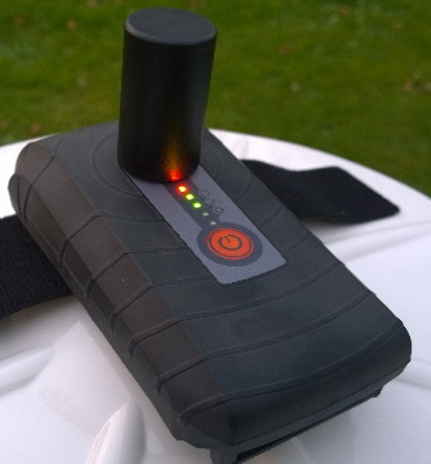
Indicators
Top (red) – power indicator
Solid On – unit is on
Slow Flashing - unit is in Synchronisation Mode
Solid Off - unit has been turned off
Circle (green) – data connection indicator
Solid Off - Cell module has been turned off in the Config.ini
Fast Flashing - Missing the SIM card
Slow Flashing - Trying to connect to the YachtBot server using the cell settings in the Config.ini
Solid On - Connected to the YachtBot servers established
GPS symbol (green) – satellite connection indicator
Slow Flashing - Trying to connect to satellites. Ensure the unit has a clear view of the sky. Outside in an open area and away from tall buildings and trees is best.
Solid On - Connected to the GPS Satellites.
Solid On with blip off - Connected to the GPS Satellites and receiving GPS corrections from a Base station (configured to work with a Base Station and receiving correction data successfully)
Audio symbol (green) – Bluetooth connection indicator
Solid Off - Bluetooth has been turned off in the Config.ini
Solid Off with a Blip on - In Pairing mode (see Help document "Using Audio with YachtBot Bio" on our Support pages)
Slow Flashing - Waiting for a connect from the Bluetooth device
Solid On - Connected to the Bluetooth device
Heart rate symbol (green) - ANT+ connection indicator
Solid Off - ANT has been turned off in the Config.ini
Slow Flashing - Waiting for a connect from the ANT device
Solid On - Connected and receiving data from an ANT+ device.